It all began with a close call with a mini potato cannon back in late August. The weather was hot, I was getting closer to fifty, and I was bored. I’d grasped the rudiments of the design of the potato cannon and was beginning to experiment. I discovered you could reduce the size of the combustion chamber, but that doing so reduced the muzzle velocity. I then discovered you could compensate for the reduced velocity by shrinking the size of the barrel, but in shrinking the barrel resulted in a minor explosion. I took this as a wake-up call, paused, and took stock.
What I needed was a hobby, a hobby appropriate for a man of my station. That is to say professor of mathematics, university administrator, and a man intent on taking a full set of eyebrows with him to the grave. I needed something that way challenging, made use of my hands, and produced a useful product. I needed something what didn’t require me to work with combustibles. I thought about it.
Then one day while surfing the Internet as I am wont to do, I came upon the following article: “You can make a Windows Home Server.” According to the article it would be easy. Putting together computers these days are like popping together tinker toys. And once the computer was built, the story said, I would be able to easily install Windows Home Server on it in a snap.
And why would I want a computer with Windows Home Server installed on it, you may ask. Well, the article had an answer for that too. If you have multiple computers in your home, which I do, then you can use the home server to back them all up. What could be cooler than that?
Well, a lot of things I guess, but it was enough for me.
And so, I began my project. If I were to relate it completely, I would tell about a side road I took where I attempted to build a computer from the ground up from a kit, but that didn’t work out. No doubt I will do such at some point in the future, but my first attempt didn’t work out, so let us concentrate on my refurbishment of my wife’s old computer.
I’d bought my wife’s computer for the use of the family when the eldest of our children entered high school. As that child graduated from college this last spring, one might discern that this machine is over eight years old. If it were a child, it would only have been in the second grade, but as a computer it belonged in a nursing home. I could get all technical on you now, but the truth of the matter is that software, in the manner of the built-in obsolescence that drives our economy and keeps us in gadget money, had marched past it. It wouldn’t run the stuff that my daughters found to be cool any more. (It is kind of like me in that respect, but then I’ve been turned into a server too.)
Regardless of these short-comings, it still had the specs—on paper at least—of running Windows Home Server. Those who are alert should note the use of ‘running’ in that sentence. It would be able to run Windows Home Server, but, the point of Windows Home Server is to support a lot of hard disk space and the machine in question sported only an 80 gigabyte hard drive.
I would be remiss if I did not digress for a moment about how strange it is to be saying only 80 gigabytes. When I started playing with computers on a TRS-80 computer made by Radio Shack, we didn’t know from hard drives. We used cassette tapes. The only people in school who knew about computers were me and a boy named Sparky in the grade below me and one day he accidentally wrote over the end of my program on the cassette. I’ve forgiven him for it; really. But the first hard drive I ever saw advertised cost $600 and was 20 megabytes. (Recall giga means times a billion and mega means times a thousand.) My first computer that had a hard drive in it proudly supported a 320 megabyte hard drive. That is about one-third of a gigabyte for those not used to the math.
So, you get the point, it seems strange to me to be referring to only 80 gigabytes.
When I first made my decision to refurbish, I took a trip to Wal-Mart and bought a one terabyte drive. As I said, mega equals times a thousand, giga equals times a billion, but tera equals times a trillion. I got this monster of a drive home, cracked open my computer case to put it in, and made a discovery. During the time since my wife’s computer had been built, not only had hard disks been increasing in size. They’d been shifting their paradigm. That is to say, the way that they plug into the computer has changed.
Let me pause from discussing hard drives for a moment and spend some time discussion a topic we may have a chance to revisit: the Motherboard. The Motherboard is the center of the computer. It takes care of everything. That is why it is called the Motherboard. I’ve seen some sources trying to call it the System board. I think this is part of a conspiracy by enemies of humanity who want to dehumanize every aspect of language, but then I am considered strange.
In any case, the Motherboard runs the computer. It has all sorts of plugs on it that you can plug the devices that constitute the computer into. For the purpose of this narrative, suffice it to say that anything you plug into a computer, you plug into the Motherboard.
Back in the day when my wife’s computer was new, IDE hard drives were the cat’s meow. They plugged into the Motherboard with impressive looking ribbon cables that were a couple of inches wide and hooked into a plug that had 40 pins sticking up. It was a scary looking son of a gun, let me tell you. Engineers, being the kind of people they are—few people skills but decent blokes with a love of making things easier but not always realizing that easy to them is not necessarily easy to use—eventually figured-out that those wide, impressive looking cables where a five-letter word for female dog to work with and fixed it. In doing so, they shifted the paradigm from IDE drives to SATA drives. SATA drives have a larger storage capacity than IDE drives, but—and this is the important part to the story—do not plug in to the same plugs.
My Wal-Mart drive was useless to me.
But, don’t despair, I am not that easy to deter. You see, it was at this point, I embarked on a false trail that added immensely to my knowledge of computers.
Having been following computers since the days of the TRS-80 and having seen many paradigm shifts in that interval, I have learned that most of the time those loveable engineers will provide a way to bridge the gap. It was at that point that I began looking for a SATA controller on a PCI card.
Ah ha, a new character has entered the stage. What, you ask, is a PCI card? It was realized at some point that people would always be wanting to upgrade their computer in some way, so our dear engineering friends provided ways to do it. One of these ways is the PCI slot. These are slots on the Motherboard—blessed be her name—into which one can plug upgrades.
I got onto the Internet and began surfing some of my favorite sites (geeks.com, tigerdirect.com, and newegg.com) shopping for such an expansion card. I found one for $13. By the way, I am convinced that there are higher laws and greater forces at work here, because these things always cost about $13.
At this point, the narrative becomes a bit messy. Without recounting all of the tragio-comic detail of the thing, let me summarize my important discoveries. The first of these is that you need drivers for these SATA controller cards. The second is they can be found on cnet.com. Don’t just go googling because if you do, you will get the wrong ones and it’s a head-ache.
The third important discovery is that, unless your BIOS supports booting from a PCI card , these first two discoveries don’t matter.
I suddenly heard the voice of a character from Star Trek in my head. It was one of the women from the planet where the men had been banished to the surface and the women had been sent underground. They had gone to the Enterprise and had stolen Spock’s brain. The voice in my head said, “BIOS, BIOS, what is BIOS?”
You probably know that your computer has an operating system. Unless you are one of a couple of select breeds—the Mac-o-philes or the Linux-o-laters—your operating system is Windows of one generation or another. However, underneath that operating system, working at a deeper, more profound, and much grittier lever, is the BIOS. It is to the operating system what the group of corporations that actually run the country is to the government. (In this analogy, Windows would be the democrats and republicans, Mac would be the Fascist, and Linux would be the anarchist, but I digress.)
You see the BIOS run at startup before your operating system loads. It controls what you can boot from. The BIOS on my wife’s old computer only has provision for booting from either the IDE plug on the Motherboard or the IDE plug that controls the CD-ROM drive. That’s it. There is no provision for booting from a PCI card, and I don’t know if any BIOS supports such.
In the midst of doing all this, I am, of course, trying to install Windows Home Server. The cognoscenti among you, if there be such, are doubtlessly asking yourselves why I was going to such lengths. Windows Home Server will install on an 80 gigabyte hard drive. It’s not ideal, but it will work, and you can always add more memory later.
The answer is this: The [expletive deleted] wouldn’t install. I spent half-a-[expletive deleted]-dozen weekends trying to get it installed. Weekend after weekend, I would start at 8 o’clock on Saturday morning with the install. Weekend-after-weekend, the message “you will be done in 51 minutes” would optimistically appear and stay there until 2 o’clock the following afternoon. At that point, it would proceed to the next step, run through it comparatively quickly, and then give me an error message that the installation had failed an invite me to view the log.
While I am not an expert at reading such logs, my naïve interpretation led me to weave the following account of the installation process’s live. Everything had been okay up to a point. Then it had begun a fruitless search for something called qs.ini. It had become obsessed with the subject. It has looked in all manner of unlikely places and, finding it nowhere, had despaired and chosen to end its own life.
Quite sad, really.
I took this information to the Internet and began reading discussion boards on problems with installing Windows Home Server. I found it broached by others in a number of other places. Solutions were offered. I cannot reproduce most of them literally, but I can give a metaphorical account that is non-technical and gives a flavor of what was required.
Take your right hand and nail it to the dining room table with one nail through the pinky and another through the thumb. Then take a scalpel in your left hand begin the process of peeling your fingers down to the bone. Don’t use any anesthesia and have your wife or a family member standing by with smelling salts to revive you if you ever lose consciousness.
Amidst this sort of advice I found one tiny voice saying, “No, no, you don’t need to do all that. You need to replace your CD-ROM drive. That is what is causing the problem. It will only cost $13.”
The other voices would inevitably reply, “$13? Are you MAD? Your hand is free and you don’t even have to use a scalpel. A sharpish butter knife will do.”
Having synthesized all of this, I spent about $50 on various bits of hardware, and planned my D-Day. I took the sane bits of advice offered and began my attack. Along the way I’d learned that there was an adapter for SATA drives that allows you to plug them into the IDE plug and boot from them. It cost about $13 dollars. That, a new CD-ROM drive, and $24 worth of other stuff made up my order.
At 8 o’clock the Saturday morning before finals week I began my attack. I installed my SATA/IDE adapter, tried to boot, and nothing happened. I couldn’t even get as far as I had before. I then replaced the CD-ROM drive, turned on the computer, and it booted so quickly the CD-ROM sounded like a jet engine. Windows Home Server was successfully installed by noon.
The project from inception to complete took about four months. It was transformative of me. I can now change a hard disk faster than my wife can put a load of laundry in the washer. (I’ve actually done this, but she didn’t know she was competing so that probably isn’t fair.) I can removed Motherboards with alacrity. I am on my way to being a geek’s geek.
And I didn’t lose a single eyebrow in the process.


 and
and  are stand ins. They might be representing complicated expressions. For example,

 being replaced by $xy$ and
  being replaced by
  , and
, and

 being replaced by
  and
and  being replaced by
  .
.
 and
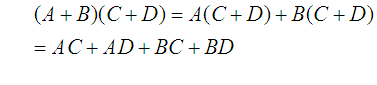
and  and watch them interact. That is to say I will multiply
  by
by  .
.

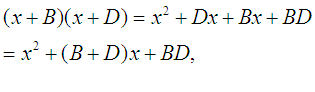

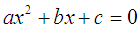 of the first chapter. Since
  , I can divide both sides of the equation by it and not change the value of
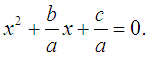
  required for the equation to hold true. That is to say, I can consider
 and
and  so that
  and
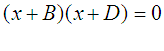
and  , then
 and
and  , that is to say
  or
or  .
.
 and
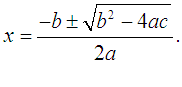
and  . Pursuing solutions in this way in an entertaining mental exercise similar to Sudoku, but, for practical purposes, a more general method is required and that general method is the General Quadratic Formula in whose derivation we are currently proceeding.
 ,
,  , and
, and  be numbers with
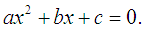
  . Suppose that
  is such that

 Okieinexile's Blog